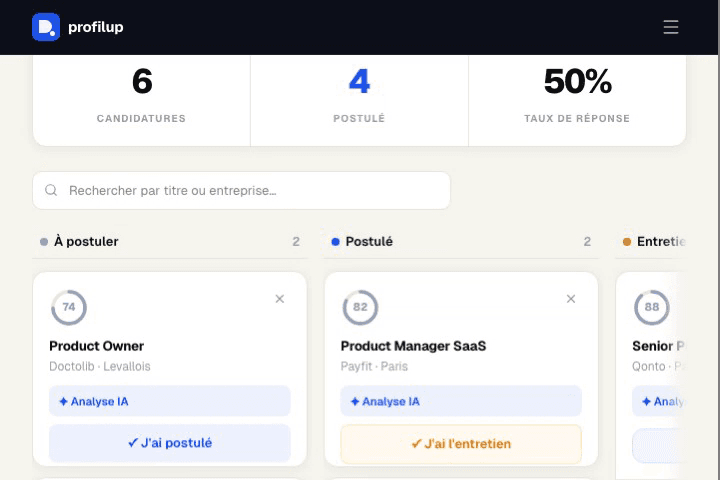
Your job pipeline
How the application tracker works
The tracker centralizes every application in a 5-column Kanban board (Wishlist, Applied, Interview, Offer, Rejected), with each listing's compatibility score visible at a glance.
- 1Add an application manually, or send a listing straight from Job Radar or the Chrome extension in one click.
- 2Each card shows the AI-computed ATS compatibility score, the company, the role, and the application date.
- 3Drag cards between columns as you progress: Applied → Interview → Offer (or Rejected).
- 4Add notes per application (contacts, interview feedback, next steps) so nothing gets lost between follow-ups.
Example: after a Job Radar scan, you send 6 matching listings to the tracker in one click. Two weeks later, the Kanban board shows at a glance that 4 are still "Applied", 1 moved to "Interview", and it's time to follow up on the remaining 4.
Frequently asked questions
Is the tracker free?
Yes, up to 10 applications on the Free plan. Boost and Pro unlock unlimited tracked applications.
Are my applications saved if I'm not logged in?
Without an account, applications are stored locally in your browser. Logging in syncs them to your account so they're accessible from any device.
Where does the ATS score shown on each listing come from?
It's the AI-computed compatibility score between your profile and the listing, the same one used by Job Radar and the matching tool — it doesn't change once the application is added to the tracker.
Can I add an application that didn't come from ProfilUp?
Yes, you can add any application manually, even for a listing found outside Job Radar.